Thursday, October 1, 2020

How to change default browser or program in window 10


When you click on a web link in an email or any messaging app, it will open in whichever browser is set as the default. for example  in your machine Microsoft edge is set as a default but you want to change your default browser as Chrome or Firefox. So here's how to set your preferred browser as default in Window 10 Operation system.

If you're not careful when installing any new applications on Windows then they can be make themselves the default for opening various files or links. For example, many people prefer Google Chrome over Internet Explorer or Microsoft Edge in Windows 10. 

Here we have explain how to change your default browser so that links always open in the right one.

How to change your default browser

When you first install a new web browser it will ask you if you want to set it as the default. This is a good practice to do so, as well as to import things such as bookmarks, browsing history and other preferences from your old browser.
If you skipped this step or declined it intentionally but want to make it your default, here's how to do it.

Chrome

If you want to use Chrome or any other web browser, either go to Control Panel if you're running Windows 7 or earlier, or open the Settings app in Windows 10

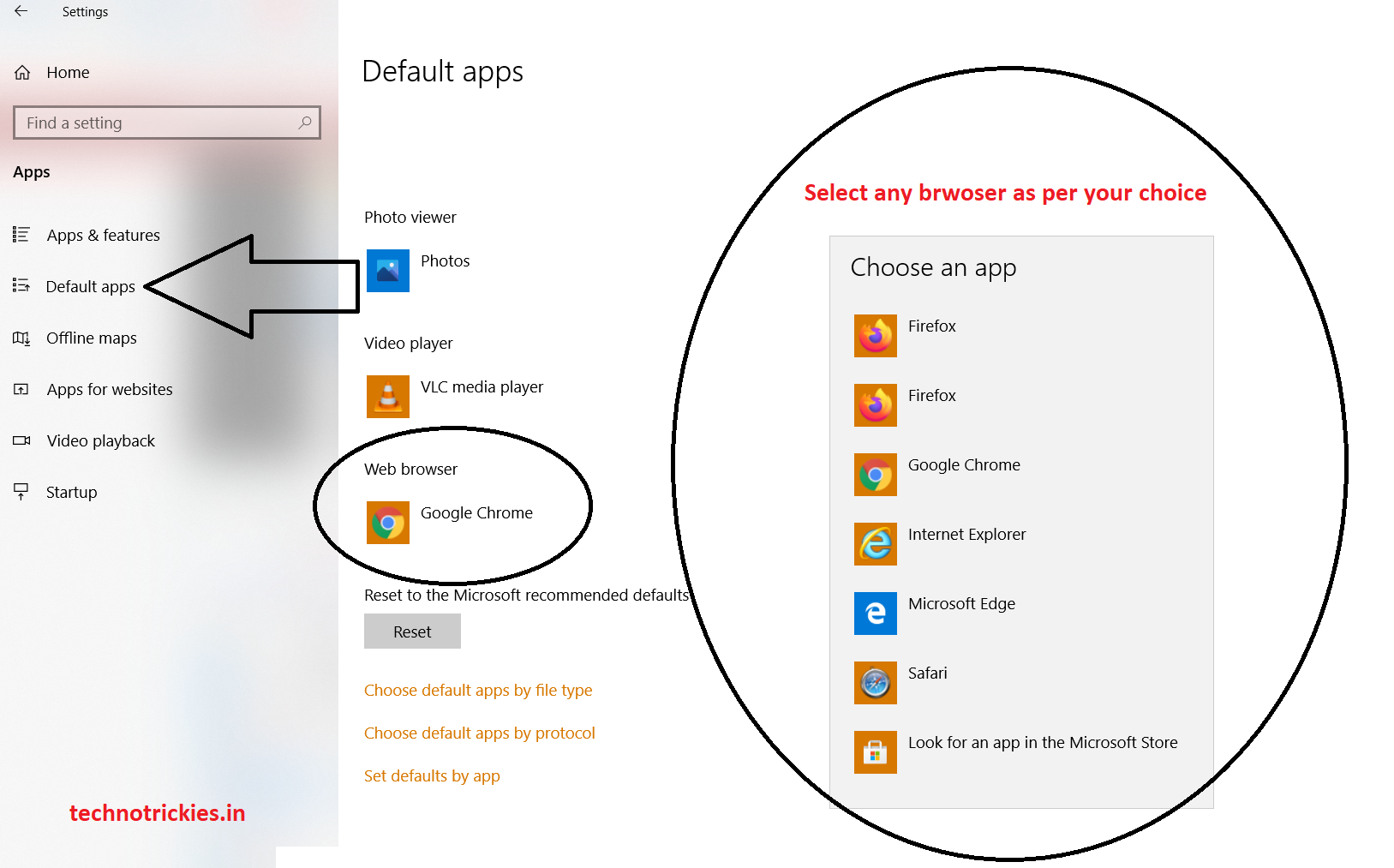
In Windows 10 in the Settings app, simply click on Apps and then Default apps. Scroll down and change the default browser using the drop-down menu.


Firefox

similarly you can set with Firefox as default. you just follow the above given screenshot.  


In Windows 7 or 8 , Go to Control Panel go to Programs > Default Programs and then Set Default Programs. Scroll down the list to find Chrome (or the browser you want) and click on it. Now click "Set this program as default".

In this manners you can change the default program in your window or machine. you can also change media player, default image viewer etc.

Do let me know your thought and comment me in case of any question.


Tuesday, September 29, 2020

Top Chrome Extensions to Prevent Dangerous Web Tracking


When ever you visit any websites that tracks you to try and link your browsing history to your interests and, in turn, show you targeted adverts. if you’re searching for a new phones the next, ads for that eCommerce website you looked at are stalking you around the web

If you want to know about how you’re being tracked across the web, take a little time to read (and disable) the cookie options that appear each time you visit a new site. 

There’s another way to push back against online tracking: Bring the blocking tech to your current browser. These browser extensions are a simple first step in improving your online privacy.

Privacy Badger

Privacy Badger is one of the best technique for block the online tracking in your browser that you are using. It’s an open source software.

Privacy Badger tracks all the elements of web pages you visit including plug-ins and ads placed by external companies. If it sees these appearing across multiple sites you visit, then the extension tells your browser not to load any more of that content. 

This extensions is available for Chrome, Firefox (desktop and Android), Microsoft Edge, and Opera.
 

DuckDuckGo

DuckDuckGo is best tool for its anonymous search engine that doesn’t collect people’s data. it control privacy for the whole web and own mobile browser as well. DuckDuckGo also makes an extension for Chrome.  

It provides below mentioned facilities 

Private Search
Tracker Blocking
Site Encryption


Ghostery

 Ghostery is a free and open-source privacy and security-related browser extension and mobile browser application. Its browser extension blocks trackers and shows lists of which ones are blocked for each site also it will works for slow load websites as well.

Adblock Plus

Adblock Plus is an open-source browser extension for content-filtering and ad blocking. it is very powerful extension for chrome browser. this extension will make your device and data safe.

  1. Faster, More Enjoyable Browsing
  2. Keep Your Data And Devices Safe
  3. Not All Ads Are Bad


Saturday, September 26, 2020

Important Things to Look for When Buying a New Laptop


 Buying a new laptop is not an easy thrill as there is a huge variety of laptops in the market. It just confuses people to choose the best for themselves. There are many options to choose from. We are trying to make this process easier for people, so that they are given a set of criteria, some basic things besides budget, which everyone should think about before purchasing new equipment. Given below are some of those important things.

1. Size

The size of the laptop varies from 12 inches to 17 inches. However, it all depends on what your device is used for. Therefore, it is important to choose an ideal size. Devices ranging from 12 to 14 inches are portable in addition to being thinner and lighter than others.

These include the EliteBook and Ultrabook. Traditional notebooks are around 15.6 inches, which makes them a good mix of portability and power. Convertible devices can convert to tablets because the keyboard either detaches or folds. Some also have a touch screen option. These devices are available in almost all brands, such as HP, DELL, ASUS and LENOVO.

2. CPU

Processing speed is another important factor in the search for new laptops. Most devices are equipped with Intel's core based CPUs, such as the i3, i5, i7 and i9 series. You can look out for one according to your need. The i3 series of laptops has enough power to perform all basic functions.

But the i5 processor is mainly found in most high-end laptops. The i7 is for those who need the best performance from their machines. On the other hand, the i9 are more powerful than the i7.

3. RAM

You can always upgrade the RAM of your new laptop. Almost all devices have a minimum RAM of 4GB. However, if your usage involves heavy applications, you should consider at least 8GB or 16GB of RAM.

4. Storage

Another important thing is that when buying a new laptop, its storage is to be seen, because no one would want their device to run out of storage space. Previously, hard drives were used in many laptops, but today's machines are equipped with solid state drives (SSDs).

SSDs can increase the overall performance of devices, as they provide higher speeds. They can load data very fast during system boot up. So, if you are searching for one

Friday, September 25, 2020

Top article spinner tool free and Paid | Best article rewriter tool | Article spinner 2020


Are you thinking of the excellent Article Rewriter & Article Spinner Tools?

Then you’re touchdown at the proper place…

In this blog, I’ve amassed Best Article Rewriter equipment thru which you can generate clean content material in a single click. All these equipment are rewriting entire content material which is plagiarized-free or in a human-readable format.

So, are you a blogger, student, web optimization, or a beginner??? Anyways, whoever you are.This blog will assist you to write special content. Let’s discover the Article rewriter equipment one by using one:-

1. Article Rewriter Tool By SmallSeoTools

This is one of the famous free article spinner software programs which used automatic software program technology to rewrite the content. It modified the wording of the content material however the which means of the content material are nonetheless intact.


This device is in particular designed for content material writers, Webmasters, bloggers in order to use the present content material as sparkling & special content.


Features

This online free spinner device offers dependable results. The content material generated via this device is absolutely special and excessive qualitative that your readers and search engines love.
It is an honest article rewriting software programs used by thousands of users. Recently, the device introduced 700,000 new synonyms in their software program to enhance the first-rate of content.
The device neither revolves spintax end result nor it requires you to enter spintax content material to generate clean content. All you have to do is enter the readable content material and then press enter to get readable output.

Price

This is an absolutely free tool, you can use this software program whenever somewhere 


2. The Best Spinner 4 – Best Article Rewriter

One of the smartest article spinner equipment through which you can rewrite your content material with a single click. It is an artificial intelligence based article rewriter device which creates a human-readable content.

All you have to do is copy an article and paste it in its editor, and then the Best Spinner 4 rewrite the entire content material in few seconds and offers you clean content material which anybody can study and understand.

Features:-

This article spinner device helps 14+ different languages such as Italian, French, English, and Spanish.
With The Best Spinner 4. This article spinner device spins your content material in a way so that the generated content material does no longer in shape with the unique content.
Content generated by way of The Best Spinner is one hundred percent plagiarism free and can’t be detected by way of Google as a replica content.

3. CleverSpinner Cheapest Content Spinning Software

CleverSpinner is probable the great article spinner/rewriter. Because it makes use of superior artificial intelligence for natural language processing it is capable to spin/paraphrase content material as a human creator however a lot faster.

There is a one hundred percent free three days trial, so there is no cause why you would now not attempt the software program device now.

Features

It automatically rewrites content material on each phrase and phrase stage and is additionally in a position to rewrite whole sentences.
While most different article spinners sometimes pick incorrect synonyms, thanks to the superior AI it uses, CleverSpinner solely chooses the proper synonyms.
Therefore the textual content produced through CleverSpinner is not only special however is additionally readable as if it was once written through a writer with excellent English skills.
It is web-based and rewrites content material very fast.
One can add and rewrite more than one .txt documents or use API to do the same. 

4.  Spinbot – Free Text Spinner

Spinbot is the most famous online paraphrasing tool and article spinner tool that will do a rewriting job for you. It is the fantastic article spinner tool for web optimization expert who wishes to create content material to generate back links however, it is now not desirable for unique content material creations jobs.


Features

Allow you to eliminate advertisements and captcha to facilitate rapidly content advent and article rephrasing tasks. All you have to do is enter your content material then click on the button and you’re done.
In the free version of the tool, you have constrained in many ways. So, if prefer more customization alternative for your textual content you have to change on the premium version.

Price

Spinbot is a free online rewriter tool. As free software, it does no longer supply a superior choice to rewriting the output of the content material spinning. By the usage of a free tool, you can rephrase the max 10,000 characters only.

5. Chimp Rewriter – Content Spinner Tool


Chimp Rewriter is some other text rewriting tool that used Artificial Intelligence and Natural language processing to recognize the text. It spins your article, sentence in a second with the identical human readability.

Features

he article rewriter makes use of many superior tools to write special and a hundred percent plagiarized free content. Chimp rewriter accommodates N-spin (generates huge permutations from word-groups), Anchor spin, bulk listing rewrites, random anchoring & order, and so on.
Chimp rewriter device helps nearly all languages like English, Spanish, Portuguese, German, Italian, Romanian, Slovenian, Swedish, French, Danish, Dutch, & Norwegian.
It can be integrated with content material introduction suites, search engine marketing equipment incorporating website positioning Content Machine, GSA Search Engine Ranker, Kontent Machine, WP Robot, RankWyz, Ultimate Demon, and many more. 

Conclusion

We’ve accumulated 5+ best and popular article rewriter & article spinner tools which blog writing task done for you. You can choose one article spinner tool to produce unique content for your site.


Saturday, February 14, 2015

Five ways to improve your communication with google services


Communication:

Gmail has quickly become one of the most popular email platforms on the planet, and for good reason. Signing up for a new account takes a minute, and you are immediately given a huge amount of online space, and a superior interface for your trouble. There are some adverts in the main email page, but they are subtly placed and non-intrusive, which creates space for your emailing that rivals the best from Microsoft and other email providers. The benefits of Gmail are clear- not only are you given a large amount of space to work in, but the knowledge that millions of others are using the service means that you can be assured of a quick fix if a technical problem arises. Google is a brand that everyone is aware of, and reliability is at the core of its success, so up time has been kept to a level few others can match. When you consider that spam filtering is included, there really is no reason not to look to Gmail in place of many paid-for solutions.

Google also provides other communication services, such as Google Talk and associated plugins which enable calls to be Made over an Internet. Connection for free, and also offers online chats via instant messaging. The service has been integrated into other Google offerings such as Gmail, which now offers the chat functionality within the standard Gmail window. Users can immediately chat to other Google users, and the resulting chat logs are saved to the Gmail account alongside normal emails. It brings instant messaging and voice calling to the one application, and therefore all of your communication needs can be catered for in one place. Video chat is also available, and software versions for a variety of mobile platforms enable you to use the service whenever and wherever you like. Google also offers a service called Google Voice, which is currently US-only, but is expected to come to other countries in the future. It allows calls to international phone numbers at a much discounted rate, and a unique phone number which some now use to replace there traditional Land lines.  

The Google communication services are already at a level which means that they can be used for almost all communication needs, but as they advance, they could potentially be used by large businesses, and gain a foothold in the wider telecoms and business email markets. For the average user, Google offers a lot of functionality that is independent of the computer they use, and it is hard to ignore so many clever services that are completely free to use.

Organization:

One major benefit of the Gmail interface is the way in which labels are organised and displayed. When you receive a new email, you can quickly assign a label (category) to it, and it will be available within a folder alongside similarly labelled items. In the main email list, the label is displayed with the correct colour coding. The presentat ion rivals - and in some cases surpasses - more expensive email clients.


Chat:

It is likely that when you are emailing people, they are also online, but email can be a slow form of communication w hen trying to have a conversation. If a contact is online, you can chat to them straight away from within Gmail using Google Chat. A small box will pop up showing the chat log, and it will even be saved within Gmail for future reference.


Emailing:

Gmail offers a world class email interface, which is available in any browser. Your contacts are stored alongside emails, and even a basic task manager is built into the interface. Each task can have an associated email, and typing the start of a contact's name will offer you the opportunity to email them straight away. Themes let you make the experience personal to you, and the spam protection is almost foolproof.


Groups:

Besides the well-known services, there are many other offerings from Google that can help you communicate with others. Groups is a service that lets you send mailing lists to a specific group of people, discuss events online with the same group, and even share files with each member at the tap of a button. This can be handy for businesses and those with a wide circle of friends


Speaking:

The multitude of online communication services currently available has reduced the amount of time people spend speaking to each other verbally and visually, but Google Voice and Google Talk can redress the balance. The good news is that calls will be much cheaper, or in many cases free, and they are compatible with many other Google services. The call quality can also be enhanced, as digital technology is used to deliver each call.


Monday, February 9, 2015

Five ways to improve your daily tasks with google


Productivity

When you sign up for a free Google account, you are automatically allocated a generous amount of online storage space, which is currently close to 8GB. This is higher than on most competing services, and can be used for emails, photos, documents and almost anything else you would like to store and back-up online. The Google Drive service alone takes advantage of this space by letting you create, modify and upload all types of files, and even includes the ability to manage your documents in folders. This effectively makes it a worthy alternative to Dropbox and other online storage services, but with the advantage that you can store everything you need in the one place, including your all-important email communications. If you are a power user, and use up your allotted space, you can purchase even more for a very reasonable sum, ie. $5 per year for 20GB. It is scalable, affordable, and extremely reliable.

Other services that can be used within this space include Reader, which will track and present all of the blogs and news feeds you want to fol low in real-time, and Finance, which presents business information and interactive charts and customised searches that can be used for specific communities or organisations. It is quite difficult to not find a service from Google that will help you get things done, and because they are comparable to competing software services, it is hard to even consider alternatives at times. The services on offer are also quite flexible, and can be used in a variety of ways. For example, you can set up a Gmail account to send as a different email address, such as a custom domain, and then set up your custom domain email to auto-forward incoming emails to your Gmail account. This means that you can use a completely unique identity, yet reta in the excellent organisational qualities and stability of the Gmail platform. Google Drive accepts

a multitude of file formats and lets you create and export documents in all of the most popular formats as well, so you can do all of your Office document creation through this service and never touch a software solution. The one downside of most Google solutions is that they requi re an internet connection to work, and they tend to run in browsers. The browser side can be advantageous, because it allows you to use the services no matter what device you are currently using, but many still prefer the feel of a standalone application. Software like Fluid for Mac OS lets you set up your Google services to work like apps; you can create an icon, and they will show up in their own window just like standard apps, and there are similar solutions available for Windows. There are also plans to make services like Google Drive work offline if required. This will add one more killer feature to an already long list of solutions that rea lly can change the lives of the people using them.

Five ways to improve your daily tasks

1. Sharing:

Google Drive has changed the way you create and share documents. Google Docs has now been incorporated into Drive, meaning from the one screen you can create a document, form, spreadsheet or drawing, and share it with the world. Drive works across devices and platforms, meaning any changes you make can be synced and viewed whenever you next open them up.


2. Research 

Few would argue against the fact that Google's search tool is the best in the world. It has built a reputation for providing accurate and relevant results by using the information we provide every minute of the day. Not all Google searches are the same, because a search by one person could bring up different results than another person searching the same keywords, because the system will have learnt what you have searched for in the past.


3. Keep up 

Google Reader lets you specify news services to follow, and these will be updated in real-time as the news happens, There are many clients available that utilize the service to bring the latest news to mobile phones, PCs and tablets, and it is widely recognized as one of the best news reading clients in the business, The wealth of information this service can collect is astonishing.


4. Get organised 

Google Calendar is more capable than manyd features that are included. You can set up multiple quick performance and the mynad advance h . e them with mobile devtces and your . d go on to sync ron1s h calendars on different subjects, an device, it will automatically be shown on any ot er home PC. When you make a change on one device connected to the same calendar.


5. Tasks 

A little-known feature of Gmail is the ability to create and manage tasks from within the main interface. This lets you assign emails to tasks easily, and manage everything in the one place, With your contacts also held within Gmail, you may find that this quickly becomes your go-to place for most of your productivity needs, and it certainly is an adequate competitor to Outlook, with the added pro of being free.


Saturday, February 7, 2015

Five ways to improve your everyday life with google services


Video

You Tube is one of the most popular services in the world, and setting up an account and sharing your own videos is incredibly simple. You can upload videos from a PC or a smartphone, and you can also subscribe to videos of people you know. It is an all-encompassing service that is perhaps the most social of all, and one that can be used within a circle of friends as much as to follow the famous.


Photos 

Photo sharing is hugely popular, and can be a positive force to bring people together. Picasa makes the process as easy as possible, and enables real-time sharing of the photos you take and the photos of others. Add in the ability to edit the photos and a variety of mobile apps to let you share from anywhere, and it could quickly become a favorite service that you use every single day.


The alternative  Facebook 

Google Circles is a slick social network that allow you to group together specific people into specific circles so that you can share things with certain groups and not to hers, bypassing the dilemma of whether you want you close family members to read all of your blue rants! Setting up circles is as easy as dragging and dropping and and can post comments and media just as easily as you can in Facebook. What's more, Circles scans your Gmail account for possible friends.


Reading news

Getting your daily dose of news has been made even easier by Google News. It gathers together news stories from 4,500 English language news sources across the globe, and groups stories together in a very user-friendly way. Putting articles into sections, Google News allows you to personalize the news selection by picking your favorite categories, as well as allowing you to easily share interesting reads with friends and family.


Tell The World with Blogger

Google's Blogger offers a complete solution for creating your own blog, which you can have up and running in a matter of minutes. The tie-in with Google helps a lot for search indexing and it is completely free. With the knowledge that thousands of blogs are hosted by Google, you can also be assured of the best up time available, and a continually reliable service .