Monday, December 23, 2013

New Facebook Chat Application for Android and iPhone


This is a very nice application for Facebook chat. This application is works for Android and iPhone both the smartphone. This Messenger is a fast, free and reliable way to stay in touch. It's just like texting, but you don't have to pay for every message (it works with your data plan).

Feature of this application

  • Get to your messages without opening Facebook.
  • Chat with groups and make plans on the go.
  • Bring messages to life with stickers.
  • Send photos privately.
  • Keep the conversation going: with chat heads, you can chat while using other apps. 
  • Text your phone contacts, even if you're not Facebook friends.
  • Share your location so people know when you're nearby.
  • Record voice messages.
  • Make free calls, even to friends in other countries.
  • Know when people have seen your messages.
  • See who's available on Messenger and who's active on Facebook. 
  • Stay logged in so you never miss a message.
  • Turn off notifications when you're working, sleeping or just need a break.
You can download this application form Google Play store for android and for iPhone user can download this application from apple store .
                                                              Android User

iPhone User

Watch this video


For more update Like My Facebook Fan Page(www.facebook.com/Technotrickies)

Thursday, December 12, 2013

How To Find or Recover Deleted Message On Facebook.


Some time by mistakenly you deleted you facebook chat message. So If you deleted important message from facebook then don't worry there is a solution to recover your all the message. Not even message you can recover you Picture, Video, Friend List , Remove Friend List, Send Friend Request List, Receive Friend Request, Subscriber list etc..


So what you do for recovering your message or chat history..
You just follow these steps..
Step 1:-  First of all  Login Your Facebook account using your id and password.


Step 2:- After that Go to Setting option and select the Account Setting.


Step 3:- If you click Account Setting you will appear a new window and there are one option Below Your Details     "Download a copy of your Facebook data."


Step 4:- You just click the Download a copy button that are given in your window.
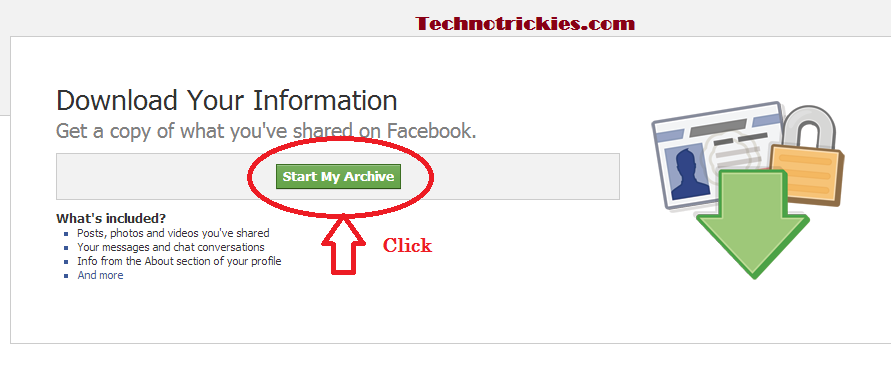
Step 5:- After Clicking you get a new window and there is a option "Start my Archive" You just click this option .


Step 6:- If it ask you to Password then Enter You Facebook Password and click Submit.


Step 7:- After clicking submit button you get a new window and then you click the "Start My Archive" And Click Ok.


Step 8:-  And wait for sometimes may be 2-3 Hours then you can do same process and in the Step 5 you can when you click "Start my Archive " then one file is downloaded automatically.  You just Extract that download file and Open Index.html file in your Browser. And if you want to search your specific friend chat history then you just click your browser windwo Ctrl+F and type your friend name on that box....

So if you run your downloaded index file then you will get a this type options........


So Now Enjoy This Tricks..... I hope You Like It.......
If any Problem You have then Comment me .....and also like my Facebook Fan Page for More Update.....
Thanks......

Friday, November 8, 2013

How To Move Photo from one folder to another folder on Facebook


If You want to move the photo on one album to another album with your time line then you can easily change it .........

What is the process to moving to photo between one album to another 

  • You go to your Timeline page and Select the Photo then go to the Album and Open  your photo album and click on the photo which you want to move.
  • After that select you Album and you will showing your already created Album ..So now you just select your album and click on the photo with you want to move to the  another album.


  • When you over the mouse on the photo it will showing a message Edit or Remove, So click this option and you will receive a now option there are some option 


  • And than you can show now some option .......
  • Than select the option  Move to Other Album,  And select the Album and click the option          Move Photo 

Now your Photo will move to your another album ..............................................
If u like this post the please like this post.............................................................