Friday, February 20, 2015

What You Gain By Mobile Payments


Mobile payments as the name suggests, is simply making payments through your mobile phone. The concept is fairly known now considering almost ALL leading vendors and merchants are adapting to this new mode of payment. But for novices, Mobile Payments are payments using the NFC chip in your smart phone and simply tapping it to NFC Reader at the payment counter. Believe me; it is as easy as it sounds! A pre-requisite however is to have your E-wallets (or service/application that bridges your financial information with the NFC payment reader and authorizes the withdrawal amount of your secure transaction).
So what do you gain by making payments through your mobile device? Let me paint certain facts which you probably are still unfamiliar with about NFC payment:

You Gain Security


Contrary to what many people think, mobile payments are more secure than making transaction through your credit card. First all data is transferred through encryption so the merchants cannot gain access to your information. Secondly, it uses pin code security so only you have the key or password to your money.


Additionally, try making an online payment through credit card where you have to enter each and every detail of your account to the merchant’s website. Now, with mobile payments, you have the additional layer of masking your account information through the ewallet that has your personal financial information safe inside. Thus, mobile payments are a much secure option.

Gained Consumer Options

With the option of making payments through your mobile phone, you have the benefit of NOT carrying cash at all. Say you are shop keeper who has NFC reader installed.  Your customers now can no longer say that they can’t buy because they don’t have the money. In the same sense, if you’re a purchaser, you need not worry about keeping cash everywhere.
Moreover, remember from a customer’s point of view, sometimes your credit card may be declined if there is a problem at the bank or you cannot remember your pin. With this NFC technology, you have the option of linking more than one financial institute with your phone. Even if your cell phone battery is dead, remember the NFC chip within your smart phone is capable of operating with your cell phone switched off.

Better Financial Protection against Theft

The risk of physical theft is always present, be it your wallet or your mobile phone. In case of robbery, a credit card is simpler to use at payment counters (as it requires a signature and that’s it). However, your NFC device is much safer! In a comparable scenario, your NFC device would not let anyone make a purchase without a PIN code that is still safe with you. Hence, the chip in your phone prevents accidental or intentional tampering and will deny unauthorized access.

Buying Choices Tapped Through Your Present Location

Would it not be nice to know the best deals, best food, and discounts, compare prices or simply buy cheaper grocery when you are within a shopping area? Well, this reality will hit big by 2015. In a poll conducted by MobilePayments Today, examining the customer shopping trends, 25% customers agree that they would like to know more as they enter a shopping mall.

You Do Not Carry Your Wallet

NFC uses RFID tags that not only allow you to make electronic payments but also stores info about saving tokens, giveaways and customer loyalty card and applies them whenever expenditures are made. Check out how a journalist was able to live one whole month with no wallet.

Gain Savings By Not Over Spending

This is where NFC gets genuinely strong. It not only handovers your money to merchants and keeps your coinage secure; the applications using NFC can offer details of your spending, your shopping routines and customs.

Gain Contacts and Social Feeds

While we will never run of commercial cards, NFC chips have the feature of storing information of your contacts so you can network fearlessly.

Gain Access Control

Who among us has not lost keys your station or residence? NFC-enabled phones allow us to open our locked doors. Users of the NFC just move their cellular device, instead of an authorization card, at a reading device, as a permit for access to workrooms, work spot, dwelling or other closed areas. 


About the Author:

Umar Jamshed is an IT expert and a former consultant with The World Bank. He is a graduate of Curtin University, Australia. He writes for Inbound.Zone and manages his IT firm.  

Sunday, November 23, 2014

How to Find Your Lost Smartphone


Android User

Google has installed a location finding feature in Android. All mobile phones with Google’s operating system with version 2.2 or higher can be easily located via the Internet with the help of the Android device manager.

1. Turn on Android device manager

You must first prepare your mobile phone so that it can be located when required. First, go to the “Google settings” app in the device and click “Android device manager” there. Now activate both options “Remotely locate this device” and “Allow remote lock and erase”.


2. Version 4.1 and higher: permit location

Another measure is required for all smartphones that have Android version 4.1 or higher: you need to allow location access in the phone settings so that your phone can be located. Move the “Access to my location” slider to “On” and confirm the displayed message with “Agree”.

3. Locating, locking and erasing your

Android device Log on to android.com/devicemanager with your Google account. In a few seconds, you will see active devices in a Google Maps view. Next to the location details, you will also see other commands such as “Ring” (functions even if the mobile phone is on silent), “Set up lock” and “Erase”.


iOS User

iOS devices are always on top on the hit list of mobile phone thieves. To curb this Apple has equipped its devices with a function that enables them be tracked, locked and erased via iCloud.

1. Setting up iCloud 

iOS devices are located via iCloud. To use iCloud, you will need an Apple ID, which iOS device users generally have. If not, get yourself an Apple ID from https://appleid.apple.com/. On the device, login with this ID under “Settings” and “iCloud”.


2. Turning on the location function

iCloud can locate much more than just the device. However, you need to enable the location function. You can do this on your iPhone or iPad under “Settings” and “iCloud”. Activate the “Find my iPhone/iPad” function right at the bottom of the list.

3. Sending a message to the finder

If you lose your iOS device, turn on your computer and log on to icloud.com with the used Apple ID. Then click “My iPhone/iPad”. The service then opens a map. A green dot indicates that the
iPhone is currently online. Click “i” to see the various available functions: you can play a signal tone or erase the device. With the ““Lost” mode”, you can block access and show a message on the
device’s display.


Windows Phone

If you lose your Windows Phone, you can track it down using some tools that are already pre-installed. The basic functions are available free of cost right out of the box.

1. Using the Windows account (Live ID)

You need a Windows account for locating Windows Phones. If you don’t have one, you can create it at https://signup.live.com. You must then link the account with your phone. To do so, click “Email
+ accounts” under “Settings” on your phone and then click “Add an account | Microsoft account”.


2. Turning on location services

To allow location search in Windows Phone, switch back to “Settings” and then to the “Location” menu item. Activate “Location services” there.

3. Locating, locking and erasing

If you have lost your Windows Phone, the website windowsphone.com is the first place to go. Log in with your Windows account and click “Find my phone” in the menu at the top right. You will then
see the current location of the phone. Similar to Google and Apple, you can also lock or erase the phone or make it ring.


Saturday, April 12, 2014

How To Transfer Contact From Outlook To iPhone Very Easily


If you are using Outlook and you have to save so many contact in your Outlook but if you want to transfer that contact to your iPhone so you can easily send it by using some simple step..you just follow the below process....

Step 1::  

First you will need to export Outlook contacts to a CSV file. To do so in Outlook 2010 or later, go to 
File > Options > Advanced and under “Export” click on the Export button. If you are using Outlook 2003, go to File > Import and Export.

Step 2::

The Import and Export Wizard window will pop up. Choose “Export to a file” and click “Next”.


Step 3::

Then select “Comma Separated Values (Windows)” and click “Next”.


Step 4::

Select the Outlook contacts folder to export. The default folder is called “Contacts”


Step 5::

Save the contacts file to the PC. In this case: “Martin iPhone 4 Outlook.csv”.


Step 6:: 

Click “Finish”.


Step 7::

The next step is to import the CSV file on the iPhone. You’ll need to use CopyTrans Contacts for this purpose. You can download CopyTrans Contacts from the following page


Step 8::

Now run CopyTrans Contacts and connect the iPhone to the PC.

Step 9::

In CopyTrans Contacts click on the “Import contacts” button.


Step 10::

Select “From a file (all contact formats)”.


Step 11::

Then navigate to the location where you saved your Outlook CSV contact file, select the file and click “Open”

Step 12::

That’s it! CopyTrans Contacts automatically loads and transfers the contacts to the iPhone.

Monday, April 7, 2014

Microsoft Office is available for iPad


Microsoft Office is one of the most popular packages the software type that enables you to work with documents. The other day he was released for the tablet from Apple. providing program-level interface has received today's order, which is optimized in order to use it as part of the sensing device. The event was once said that the Office for the iPad was designed from scratch.
This was one of the most anticipated events that expected for four years. Moreover, the announcement of Office for the iPad has become one of the most important speeches in front of an audience for Satya Nadella, who took over as head of Microsoft.
Can already download three programs Word, PowerPoint and Excel. Among the supported languages ​​are Russian. For support, the tablet must have iOS version 7 and above.


KEY FEATURES: 

Access documents from virtually anywhere: 
• Cloud – With your phone, you can access Office documents stored on OneDrive, OneDrive for Business, or SharePoint.

• Recent Documents – Office Mobile is cloud-connected. The documents you’ve recently viewed on your computer are Readily available on your phone in the recent documents panel. 

•Email Attachments – You can view and edit Office documents attached to email messages.


 Office documents look stunning:
•Great-Looking Documents - Word, Excel and PowerPoint documents look great on your phone, thanks to support for charts, animations, SmartArt Graphics, and shapes.

•Optimized for phone - Word, Excel and PowerPoint are optimized for the small screen of your phone.

•Resume Reading - When opening a Word document from OneDrive or OneDrive for Business on your phone, it automatically resumes at the place where you left off reading, even if you last viewed the document on your PC or tablet.

•Presentation Views - The Slide Navigator view in PowerPoint lets you browse slides faster, while speaker notes help you practice your presentation.

Screenshot:


Sunday, April 6, 2014

KMPlayer is now available for Android and iOS


If you like to use the application KMPlayer, then developers was prepared a little surprise. A new version of Media Player can be downloaded on devices with Android and iOS.


As expected, the developer was prepared KMPlayer attractive interface that is different functionality. In the player within the main screen will display a list of all the videos that are available within your device, as well as the standard navigation functions for access to the location where it will be possible to carry out the launch video in manual mode.


All videos that are available within the repository will have display as thumbnails, and also include information on the file size and resolution. All videos can be sorted by name or by folder, as well as using the parameters date or size.


Media library feature: 

1.Files within the device and in the memory card can be found easily.
2. Edit feature: Media file extensions and folder names can now be edited, as well as having delete, create and move functions. 
3. Video Speed - Videos can now slow down or speed up (0.5x~4.0x times the normal speed)
4. Camera roll playback (watch videos recorded from your phone)
5. Screen ratio optimization
6. Screen lock/unlock
7. Gesture based playback, fast forward and volume control.
8. Videos can be played from where it left off.
9.Previous, next file view
10.File arrangement features (file creation date, name, favorite, size etc)

Screenshot


Sunday, March 23, 2014

Apple Will Improve Card from the iPhone


Apple will finalize the application "Maps", which is part of the operating system iOS. On this, citing familiar with Apple's plans sources, said the publication 9to5Mac. Corrected "maps" to be supplied with iOS 8, which is expected to be released during 2014.

Apple, first, make the map more: it will be noted more "points" (eg, shops, cafes, ATMs and so on) than it is now. The user also will be easier to find objects of transport infrastructure: roads, airports, train stations, bus stops.


Second, the application "Maps" learn to run routes for travel on public transport. The program will specify the user, in what way (for example, on foot, by car or by bus), he wants to get to your destination, and offer appropriate route.


In addition, the "maps" can enter a tool for exploring the surrounding area, based on augmented reality technology. The screen will display the device picture from the camera, which, in turn, will be superimposed information about the objects in the field of view.


Modified "Maps", according to BGR, will not only innovation in iOS 8. In the operating system will supposedly new application Healthbook. It will record, process and store medical records (pressure, blood sugar levels) and data on physical activity.

Until 2012, the regular cards were in iOS Google Maps. C output iOS 6 company Apple, however, refused to them in favor of proprietary cards. New mapping application has been criticized for numerous inaccuracies and meager in comparison with maps Google Maps, functional.

Saturday, March 22, 2014

Apple Released The iPhone 5c


Apple is on Tuesday, March 18 launched the sale of the smartphone iPhone 5c with eight gigabytes of internal memory. Earlier iPhone 5c only sold in versions with 16 and 32 gigabytes of memory.

As of the date of publication notes vosmigigabaytny smartphone was available in Apple's online store in a few countries: Australia, Britain, Germany, China and France.

In Europe iPhone 5c with eight gigabytes of memory costs 50 euros cheaper than the 32-gigabyte unit. In Germany, the price of the smartphone is 549 euros, and in France - 559 euros.


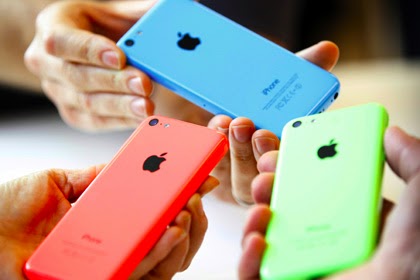
The amount of memory - this is the only difference between the new device from iPhone 5c, issued earlier. All smartphones this model 4-inch screen with a resolution of 640 by 1136 pixels, dual-core Apple A6, gigabytes of RAM and two cameras - a 1.2 and 8 megapixels. Network devices support LTE, including Russian. iPhone 5c has a plastic housing and comes in five colors: white, pink, green, yellow and blue.


iPhone 5c was released on 10 September 2013. On the same day Apple announced another smartphone - iPhone 5s, which is more expensive, but has a 64-bit processor and a fingerprint sensor.

Media linked Issue 8-gigabyte iPhone 5c with the desire to increase sales of Apple smartphone. "Plastic" phone, presumably diverges much worse than iPhone 5s.


Simultaneously with the release of iPhone 5c with eight gigabytes of memory Apple withdrew from selling tablet iPad 2 and returned to the store a fourth-generation iPad. In the U.S., the tablet starts at $ 399.


Wednesday, March 19, 2014

In iOS 8 Found the Application of Health


The structure of 8 iOS - the operating system for the iPhone, iPad and iPod touch, which is preparing to release the company Apple, - the application will Healthbook. This is with reference to anonymous sources the newspaper writes 9to5Mac. Objective of the program is to help the user to monitor their health.


Editors 9to5Mac claim to have seen with their own eyes the application and even plotted its interface. Judging from the published illustrations, apparently Healthbook program will remind Passbook, for storing coupons, boarding passes and tickets for all sorts of events.

The program consists of several sections, referred to as "card". Figures can find information on the "weight", "Food", "Water Balance", "pressure", "Physical Activity", "Dream", "Pulse". Also provides for "extra" card, which shows the user name, blood group and contact persons to be contacted in an emergency.


It is assumed that Healthbook will automatically fill in "cards", drawing on information from a number of sources. Such sources may be, for example, smart phone (step count), "smart watches" (pulse), the medical device (blood pressure and blood sugar levels). Based on these data, the application will give the user tips.

The existence of the application suggests that Apple is indeed developing "smart watches". Such a device can act as a pedometer and a heart rate monitor, such as a clock Samsung Galaxy Gear 2. Rumors of hours Apple, which supposedly will be called iWatch, first appeared in 2013.


It is expected that the operating system iOS 8 Apple will unveil at WWDC in mid-2014. Besides Healthbook, in its composition, according to unofficial data, enter the corrected application "Maps" - the company will eliminate errors in the first version. In addition, Apple will finalize the music service iTunes Radio.

Friday, March 14, 2014

AdaptiveKeyboard paint the iPhone keyboard


If you're an iPhone owner and you like variety, it's likely you will enjoy a new tweak - AdaptiveKeyboard. With this solution you can spend your keyboard coloring in the color that will be displayed within the application icon that opened.

AdaptiveKeyboard is an application that can not only change the design of the keyboard, but also a "mask" of its type in the color of the main interface to any application. Unlike many competitors focus on the device is just a platform iPhone, Android-devices not yet have this capability.

If the application icon is used several colors, the keyboard will be taken dominant. For example, if we consider the icon Facebook, is attended by white and blue, but blue is much greater, respectively, and the keyboard will get the same color.

Adaptive Keyboard Features

  • No option to configure
  • Different keyboard color in each application
  • Calculates the dominant color
  • iOS7 Cydia tweak
  • Spotlight
  • Easy  to use
  • Nice look
  • Default gray color

Friday, February 28, 2014

iTranslate Voice 2.1 Will Perform Translation on The iPad and iPhone


By Sonico GmbH release was published iTranslate Voice 2.1, which is a "remake" translator for the iPad and iPhone. The application will be supported by the operating system iOS 7 and take advantage of the interface within the operating system.


The application uses a functional voice recorder - writes the phrase and immediately gives a translation. With this application, you can increase the level of foreign language, especially if there are problems within the pronunciation and vocabulary. The program is capable of discernment sustained phrases, but this is a constant update and complement using the Internet.


The new version of iTranslate Voice 2.1 was produced adaptation to design concise type iOS 7. Another improvement playing offline mode support in case of transfer of messages a voice type that allows users to use an interpreter, even without Internet.


Features

• Universal binary for iPhone and iPad
• Support for iOS 7 offline voices (= faster translations)
• AirTranslate now works even better with new iOS 7 peer to peer technology
• Get suggestions while editing
• Improved voice recognition with greater accuracy
• Much faster translation results, especially in combination with the new iOS 7 offline voices
• Brand-new App Icon

Horizon Will Make a Snapshot of the Horizontal Type, Even for Portraits


Within the App Store has been added to an interesting utility called Horizon. You can use it to take pictures within the horizontal mode, regardless of how and under what is the slope is iOS-device that makes shooting.


It turns out that no matter how holding a smartphone or tablet. While the camera is enabled, the application will automatically switch between portrait and landscape mode depending on how the device is used the slope. Likewise, the picture will be tilted, which is for each frame is done.


By a powerful mobile processor type, which is currently embedded in the iPhone, movie, which turns out, looks almost perfect. In the case of digital picture stabilization application cropped by the edge of the resulting video, so some of the details in the frames of this process may be lost. Despite this, the quality is not affected.


Screenshot


Wednesday, February 26, 2014

Weatherboard Allow the Use of Animated "Weather" Wallpaper iOS7


Weatherboard is a mobile application that offers animated backgrounds for the program on the weather forecast in iOS 7. As part of the home screen and lock screen will be set dynamic wallpaper.

Unfortunately, the application does not produce Weatherboard nomination wallpaper automatically according to the weather, which is now available. It is possible this feature will be included in the next version. Instead, users can be selected from a library of wallpaper, in which are 40 animated file type, for each of which there is a day and night version. Respectively obtained only 80 wallpapers.

Scheme of the application is simple. There is a menu, which is added to the utility application settings set with the instructions given under each option.

Sunday, February 9, 2014

Peek - a handy calendar for iOS


Peek is a quick and simple to use calendar for your iPhone. It is designed to be glanceable and intuitive.
Peek is a new pay calendar, which runs on mobile devices with the platform iOS. It is addressed to those users who do not have to plan your day from morning till evening on the week ahead. With the application the usual calendar becomes interesting playground, which will manage the events within the framework of gestures.


In calendar interface combines Peek "flat" type blocks stained with days of the week with the organization of multidimensional data type. When you touch on certain days, they will be disclosed as origami and show events that are scheduled. In the case of re-touch they are collapsed. For users who have not previously used the Peek, sign kit may seem complicated, but after some time of use will be found a lot of interesting and useful tools


Life can be stressful, why not managing it in a slightly more playful way. Peek is designed to offer a fluid, fast and fun way to have a glance at your schedule. 
Along with a fresh look into the user interface, it introduces new behaviors for interaction to make the experience more delightful. Try the Peek’s shading gesture or simply shake the phone to see some Peek's life events.


Features:


  •  A completely redesigned calendar experience for iPhone. 
  •  An interface that is clean and content focused. 
  •  Unified timeline view. 
  •  Expanded current week: Today, Tomorrow and the rest of the week.
  •  Tap and hold on any day to add a new event.
  •  Drag or swipe to the right to peek and view the length and the location of events. 
  •  Simple and fast to add events or edit them. 
  •  A completely redesigned time picker interface. 
  •  Shading gesture to reveal the time.
  •  Shake to get suggestions on Peek’s life events. 
  •  Sound and vibration feedback. 
  •  alarms integrated. 
  •  Timezone Support. 
  •  Two color themes. 
  •  Monday/Sunday start option.


Tuesday, February 4, 2014

SwiftKey Keyboard is Available for iPhone


SwiftKey is one of the most popular types of virtual keyboards for mobile devices. Now it is available for smartphones and tablets iPhone iPad. Such data shall be reported blog developers. SwiftKey previously could only be used within Android. The keyboard is built within the App SwiftKey Note, that is used to store notes. Other programs can not work with it, because Apple's restrictions. SwiftKey Note To use another application API zametochnogo type, which is also popular - Evernote.

**Actions Allows You to Control Your Computer Using the iPad**

SwiftKey has the appearance of the regular keyboard iOS, it has a function for predictive. Program are trained, by observing how the user is engaged in printing and developing capacity for divining the following words. Variations of words will be displayed within the panel, which is located above the keys.

**WORDWEB a Free Dictionary For Window, Android and iPhone.**


Saturday, January 25, 2014

TeamViewer will work with a lot of Android devices


TeamViewer is a popular global manufacturer of security software layer that can be used in remote locations to organize interactive conference. The company plans to expand mobile device support type. For this was released an updated version of the application TeamViewer QuickSupport.


Now, with the application can manage a large number of devices that work with the platform Android.
With the help of the popular application TeamViewer QuickSupport provided remote support for smartphones and tablets using any device with the Windows platform or Mac, that is running TeamViewer. 

Offer used IT-support groups, thereby making it possible to conduct rapid diagnosis and troubleshooting of mobile devices.


Screenshot